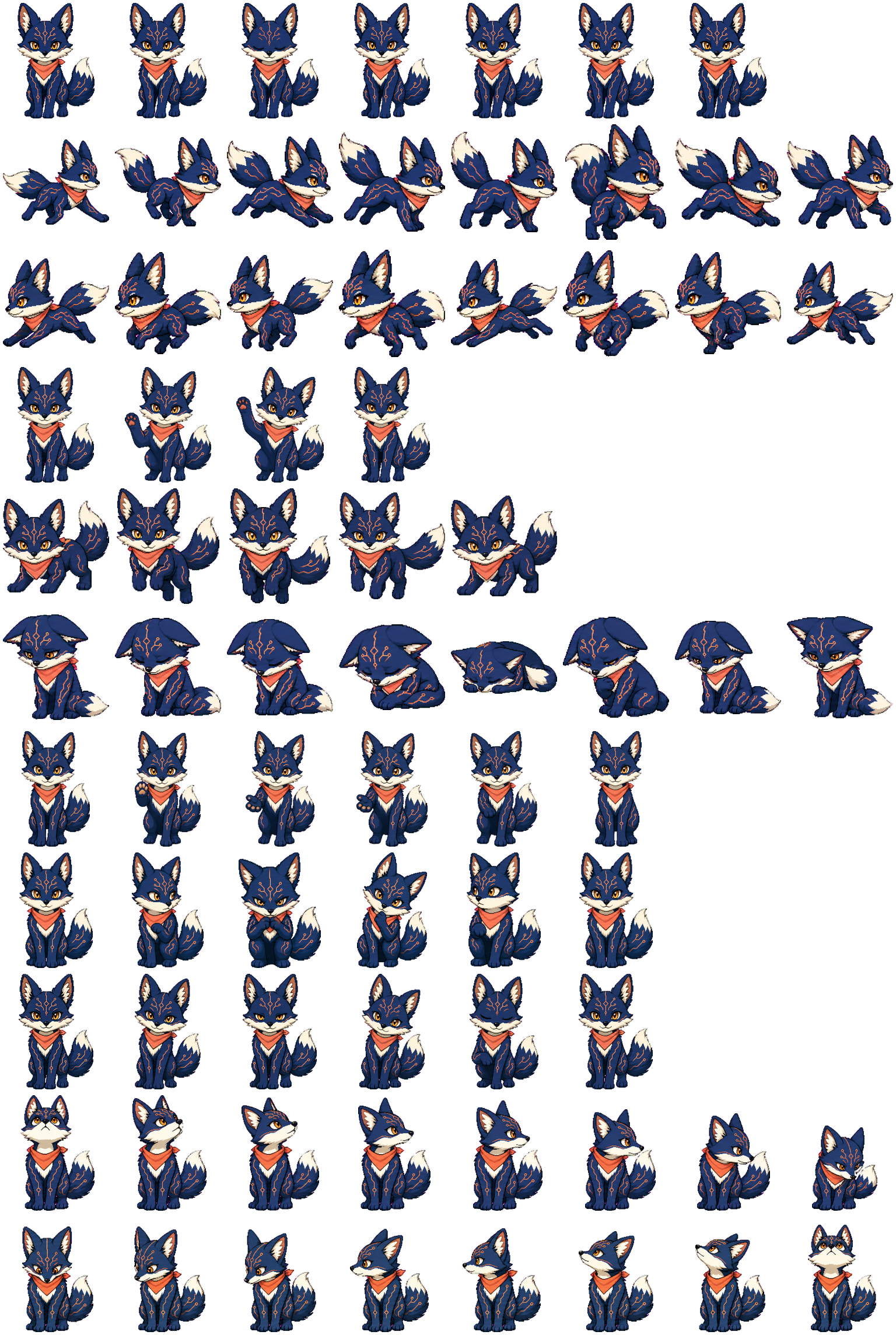
OpenAI image generationKeeps the character consistent while generating distinct expressions and work-state motion
Animated Desktop Pet StudioPet Studioby Lumisia
FOR CHATGPT DESKTOP · CODEX PETSBETA
Your character, now a Codex companion.
Create an original pet from an illustration or a written brief. Preview every work-state motion, keep it in your local collection, and share an interactive preview.
What is a pet?Preview work-state motion liveKeep pets in this browserShare an interactive preview
MatoiRunning
Pets made in this studioPreview its motion, then try the finished pet without generating
GENERATED IN PET STUDIONo generation · no waitMatoi
Download petClear storage boundariesSource images are not stored; finished pets use a shareable install URL
Codex readyCodex v2 compatible · Transparent PNG · 8×11 animation · 16 directions
WHAT IS A CODEX PET?
A small companion that keeps your work visible on your desktop
In the ChatGPT desktop app, a pet can float above other windows. It reflects work status through animation and takes you back to the relevant task when selected.
01
Drag the small companion somewhere it will stay helpful without getting in the way.
Move it anywhere on your desktop
Its selection and position persist when you reopen the app
It changes appearance only, not Codex responses or capabilities
Pet workspace
09:41Your pet appears here
02
What your pet can surface
RunningA task is actively working
Needs inputYour approval or answer is needed
ReadyAn unread result is waiting
BlockedA chat failed or encountered a system error
03
Where does a pet appear?
Location and capabilities depend on the surface you use. Availability can vary by account and workspace.
Check current Pets support in OpenAI docsFloating overlayChatGPT desktop
Floats outside the app and can surface activity across chats.
Inside chatsChatGPT web
Appears in supported Work chats without the desktop floating overlay.
Inside terminalCodex CLI
Reports activity for the current CLI session in a supported terminal.
Not availableIDE extension
Does not provide a pet picker or floating pet overlay.
PET CREATOR
Create your one-of-a-kind pet
Choose a name, describe the look, and pick a style. A live checklist keeps every required step clear.
YOUR PET COLLECTION
Bring every pet back when you need it
Revisit pets you have created, replay their motion, and share an interactive preview link.
The collection list stays in this browser, and source images are not stored. Generated pet files use a shareable install URL; newly created pets can also be deleted permanently here.
Your first pet will appear here
Create a pet and it will be added to the collection on this device automatically.
HOW IT WORKS
From idea to a validated companion in three steps
Upload or describe
Start with your own illustration or a short written brief.
Generate character and motion
Preserve character identity while creating distinct expressions and motion for each work state.
Validate and add to ChatGPT
Transparency, dimensions, work-state motion, and all 16 directions are checked before install or v2 package download.
AFTER INSTALL
How to show it after installation
- 1
Choose your new pet in ChatGPT desktop under Settings → Pets
- 2
Enter “/pet” in a chat or choose “Wake Pet” from the command menu
- 3
Drag the floating pet to your preferred desktop position
The desktop floating overlay requires a ChatGPT desktop app with Pets enabled. Web, CLI, and IDE surfaces have different display modes and availability.
CODEX PET FAQ
Frequently asked questions about Codex pets
Check compatibility, files, and data handling before you create your pet.
What is a Codex pet?
A Codex pet is an optional animated companion that reflects work status in ChatGPT desktop and supported Codex CLI terminals. It can show states such as Running, Needs input, Ready, and Blocked, but it does not change Codex responses or capabilities.
How do I make a custom Codex pet?
Start with an image you have permission to use or a short character description. Choose a name and style, confirm usage rights, and the studio generates and validates a pet with work-state motion and all 16 look directions. Creation can take several minutes.
What files can I download?
The studio provides a pet file for ChatGPT web upload and a Codex v2 package for the Custom pets folder in ChatGPT desktop. The v2 package includes a transparent 8×11 animation atlas and all 16 look directions.
Where can I use a Codex pet?
The floating overlay is available in ChatGPT desktop when Pets is enabled. ChatGPT web and supported Codex CLI terminals use different display modes, while the IDE extension has no pet picker or floating overlay. Availability can vary by account and environment.
Are uploaded images or finished pets stored?
Source images are used only for generation and are not stored. Finished pets are hosted at a URL for installation, previews, and sharing, while the collection list stays in this browser. Newly generated hosted files can be deleted from this page.
Is this an official OpenAI or Codex service?
No. This is an independent third-party tool, not an official OpenAI or Codex product or partnership. Use the OpenAI documentation linked on this page for the latest information about Pets availability.
Give your workspace a small companion.
You can try the creator before signing up. Start with an image or a short description.